
First month for free!
Get started
Published 1/10/2026
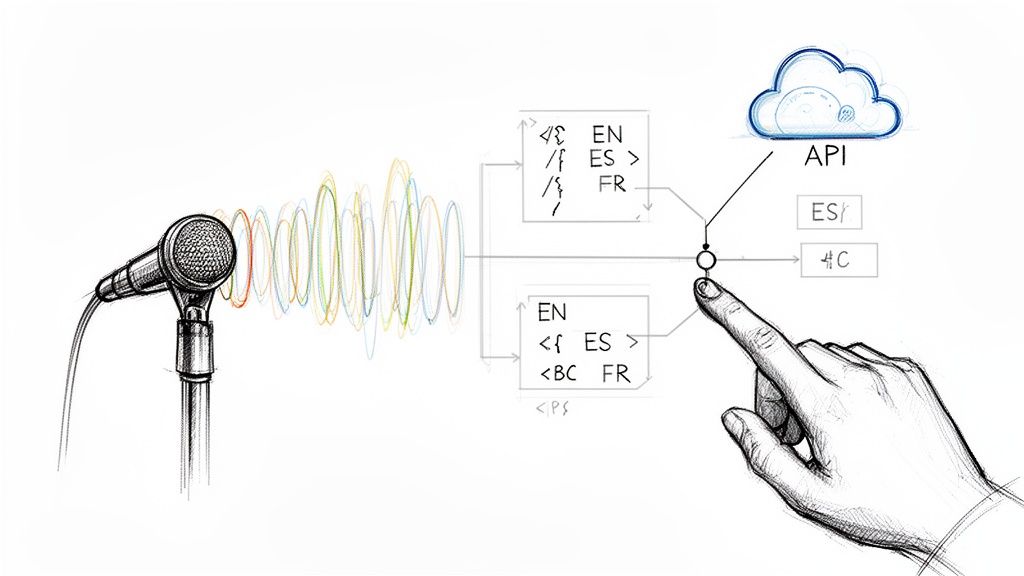
Figuring out what language is being spoken in an audio file is the first, most critical step in processing global content. You can either analyze the sound itself—its acoustic properties—or just run it through a multilingual transcription model to see what language pops out. Getting this right lets you route the audio to the best possible speech-to-text engine, which is a game-changer for accuracy and the user experience.
So, you've got audio coming in from users all over the world, speaking dozens of different languages. What's the plan? You could ask them to select their language from a dropdown menu, but that’s a clunky solution that adds friction and just doesn't scale. This is precisely why automatic language detection has gone from a "nice-to-have" feature to a core requirement for any serious application.
Nailing language detection has a direct impact on your product and your bottom line.
The need for this is exploding. The global market for speech and voice recognition is on track to jump from USD 19.09 billion in 2025 to a massive USD 81.59 billion by 2032. A big driver for that growth? The demand for systems that can handle a multitude of languages in real time. For developers, this is a clear signal: language ID isn't an optional extra anymore. It's a foundational piece for building a competitive product. You can dig into the numbers yourself in the voice recognition market report from Grand View Research.
The real challenge isn't just identifying a single language in a clean, perfect recording. It's dealing with the messy reality of real-world audio—background noise, super short clips, and even "code-switching," where someone mixes two or more languages in the same sentence.
This is where having the right tools makes all the difference. An API like Lemonfox.ai builds language identification right into its speech-to-text pipeline, taking that complexity off your plate. It gives any developer access to powerful and accurate language detection, letting you build smarter, globally-aware apps without needing a Ph.D. in phonetics.
So, you need to figure out what language someone is speaking in an audio file. When you get down to it, there are really two main ways to tackle this problem. Each comes with its own set of trade-offs in speed, accuracy, and cost, so picking the right one is all about understanding what your project truly needs.
It’s a classic engineering dilemma.
The first route is what we call Acoustic Language Identification, or LID. This technique doesn't bother trying to understand the words being said. Instead, it listens directly to the raw audio, analyzing the foundational sounds—the phonetics, rhythm, and intonation—that give a language its unique acoustic fingerprint.
Think of it like identifying a musical genre. You don't need to know the lyrics to tell the difference between jazz and punk rock; you can feel it in the rhythm and instrumentation. Acoustic LID does the same thing for spoken language.
Because it skips transcription entirely, this method is blazing fast and requires very little computational muscle. It's the go-to choice for real-time scenarios where every millisecond counts.
A few real-world examples where this shines:
The second strategy is a two-step dance: first transcribe, then detect. You start by feeding the audio into a robust multilingual Automatic Speech Recognition (ASR) model, like the one we've built at Lemonfox.ai. This gives you a text transcript. From there, you just run the text through a standard language detection library.
You're essentially turning a complex audio problem into a much simpler, well-understood text problem. Given that AI in language processing for text is incredibly mature, this method often pulls ahead on accuracy. It's particularly good at nailing short clips or tricky audio where multiple languages might be mixed.
Of course, that extra accuracy comes at a price: higher latency and more processing power. Transcription is a heavy lift compared to simple acoustic analysis.
The decision really boils down to this: Do you need a good-enough answer right now (Acoustic LID), or can you wait a beat for a more reliable one (ASR-then-text)?
This flowchart lays out the thought process for handling incoming audio pretty clearly.
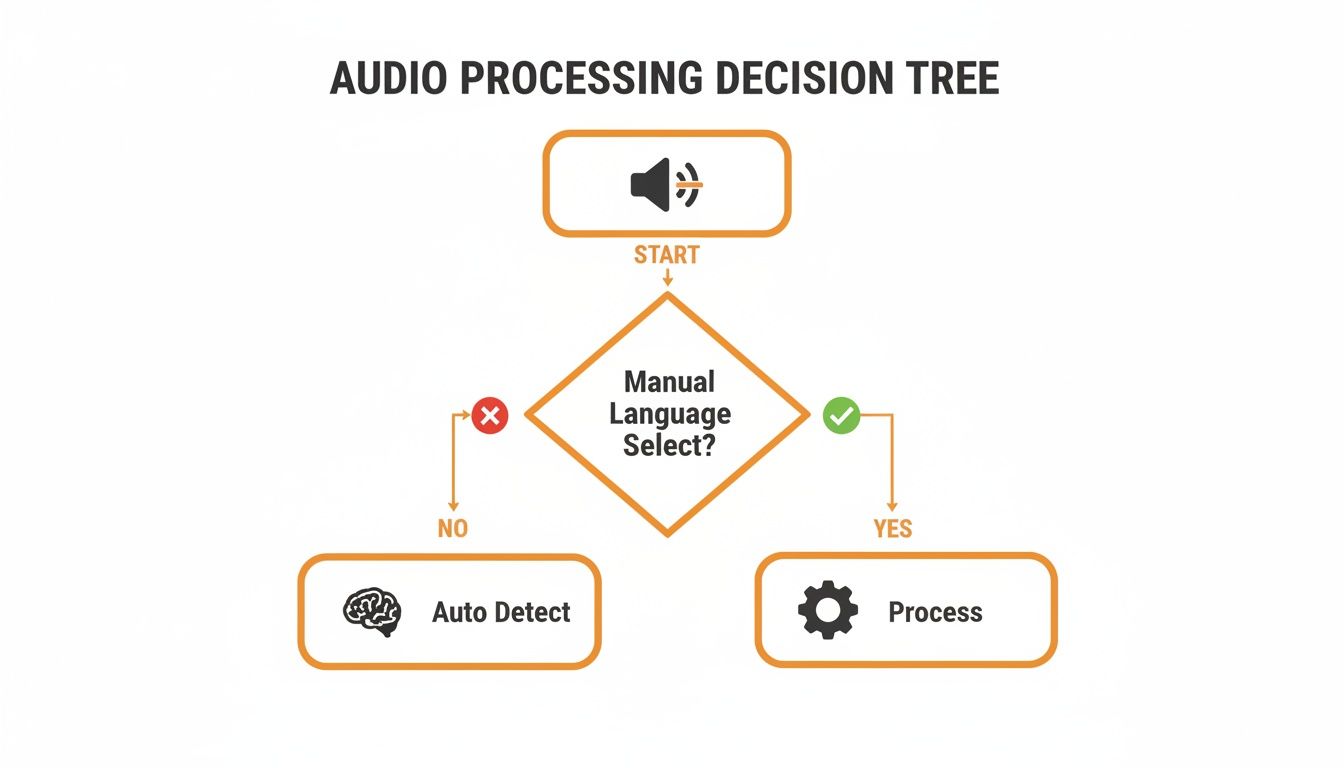
As the diagram shows, once you can't rely on the user to tell you the language, auto-detection is your only option for building a scalable system.
To help you weigh the pros and cons more directly, here's a side-by-side breakdown of the two strategies.
| Factor | Acoustic Language ID (LID) | ASR-then-Text-Detection |
|---|---|---|
| Speed | Extremely Fast. Analyzes raw audio without the overhead of transcription. Ideal for real-time use. | Slower. The ASR transcription step adds significant latency. |
| Accuracy | Generally lower, especially on short or noisy audio clips. Can be less reliable. | Very High. Benefits from mature text-detection algorithms. More robust and reliable. |
| Cost | Lower. Computationally cheaper and requires less processing power. | Higher. ASR is a resource-intensive process, increasing computational costs. |
| Complexity | Simpler to implement if using a dedicated LID model. | More complex, involving two distinct stages (ASR and text analysis). |
| Best For | Call routing, quick content flagging, real-time moderation where speed is critical. | High-accuracy transcription, meeting minutes, voice notes, applications where precision is paramount. |
Ultimately, choosing the right path depends entirely on your specific use case and constraints.
For developers, this is where a service like Lemonfox.ai simplifies things. Our API bundles a highly accurate multilingual ASR engine that also returns the detected language—you get the best of the second approach (high accuracy) without having to glue two separate systems together yourself. It's one efficient, reliable API call.
You can't just toss raw audio files at an API and expect magic. The old developer mantra "garbage in, garbage out" is especially sharp when it comes to audio processing. Just like a blurry photo throws off image recognition, messy audio will trip up even the most sophisticated language detection model, leading to bad results and a frustrated user.
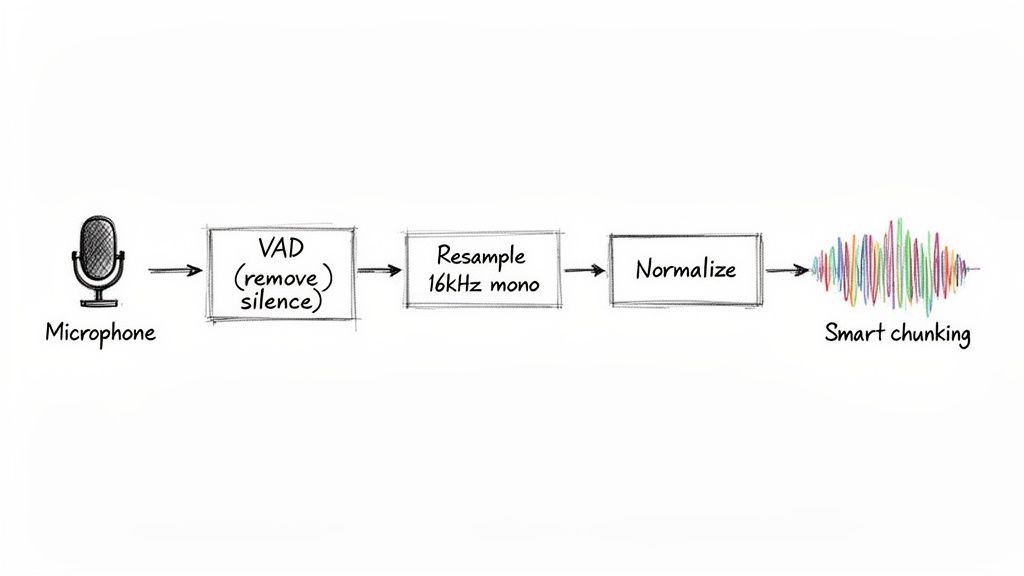
Before you even think about sending your audio for analysis, a few preprocessing steps are non-negotiable. Think of them less as tweaks and more as the foundation for getting anything remotely accurate out of your system.
The first and most impactful technique is Voice Activity Detection (VAD). It's a surprisingly simple but powerful way to find and chop out all the non-speech segments—long silences, annoying background hum, or that dreaded hold music. Feeding a model minutes of silence is a complete waste of compute resources and money. Worse, it dilutes the actual speech, making the language much harder to pinpoint.
By stripping out silence with VAD, you're not just cleaning the file—you're focusing the model's attention exclusively on the parts that matter. This single step can significantly boost both speed and accuracy.
Once you’ve isolated the actual speech, the next job is standardization. Audio is a wild west of formats, sample rates, and channel counts. But most speech models are trained on a very specific, standardized format: 16kHz mono WAV.
Getting your audio into a consistent format is crucial. If your source file is recorded at a high-fidelity 44.1kHz or a low-fi 8kHz from a phone call, you have to convert it to 16kHz. This ensures the model receives the data in the exact structure it was trained on. Along the same lines, always convert stereo tracks to a single mono channel to avoid potential phase issues and simplify the input.
This whole process is about normalization—making every file, no matter its origin, look and sound the same to the model. Here’s a quick rundown of what you need to do:
Finally, you need a strategy for long recordings. Trying to send a two-hour audio file in a single API request is a recipe for timeouts and errors. The answer is smart chunking.
Break that massive file into smaller, more digestible segments—something in the 15 to 30-second range usually works well. This makes the whole detection process more resilient. Plus, it opens the door to processing chunks in parallel, which can drastically speed up throughput in large-scale applications. Getting these preprocessing steps right is the real secret to reliable language detection from audio.
Alright, let's put theory into practice. Using an API like Lemonfox.ai is a great way to detect language from audio because it bundles high-accuracy transcription and language identification into a single, efficient call. This ASR-then-text-detection approach saves you from juggling separate models, giving you a reliable language code right alongside the final transcript.
The integration itself is pretty painless. Once you've grabbed your API key from the Lemonfox.ai dashboard, you’re ready to start sending audio files. The whole interaction boils down to a simple HTTP POST request to their API endpoint, which includes your audio data and your authorization token. The API does all the heavy lifting and shoots back a clean JSON object.
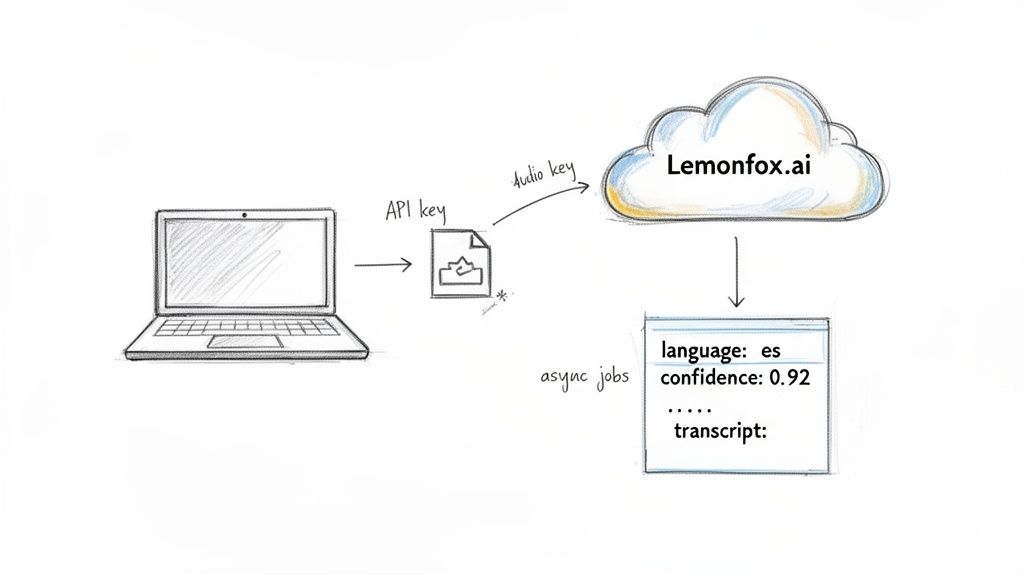
To get things rolling, your request just needs two things: your API key in the authorization header and the audio file itself in the request body. Most modern ASR services, Lemonfox.ai included, are built to be developer-friendly, so you can just use standard libraries like requests in Python or axios in Node.js.
The response you get back is incredibly useful. It typically looks something like this:
language: An ISO 639-1 code (like "en" for English or "es" for Spanish) that tells you the detected language.text: The full transcription of the audio file.words: A detailed array of individual words, often with start/end timestamps and confidence scores.This combined response is a game-changer. You don't just get the language; you get the full text, ready for whatever your app needs to do next—be it analysis, display, or storage. For really robust AI applications, especially audio language detection, picking the right infrastructure like powerful dedicated servers for machine learning can make a huge difference in performance and scalability.
Of course, a basic request is one thing, but production systems need to be more resilient. What happens if a user uploads a massive, hour-long podcast episode? A standard synchronous request is almost guaranteed to time out.
For longer audio, you absolutely want to use an asynchronous endpoint. The process is simple: you submit the file and instantly get a job ID back. From there, you just poll a separate endpoint with that ID to check the job's status and grab the results once the processing is finished.
This asynchronous pattern is essential for building scalable apps that can handle unpredictable workloads without grinding your main application thread to a halt.
The most critical piece of information in that API response is often the confidence score for the language prediction. A high score (say, >0.9) means you can be pretty sure the result is accurate. A low score might be a flag for a manual review or a fallback action, like asking the user to confirm the language.
It’s no surprise that cloud deployment has become the go-to for integrating audio language detection. It lets developers tap into huge multilingual models without the headache of maintaining complex infrastructure. In fact, cloud solutions make up about 62% of the speech and voice recognition market in 2024, a number that's only expected to grow.
For developers building products that need to automatically detect and transcribe multiple languages, these figures are a clear signal. The trend is moving decisively toward API-first services that deliver both language ID and transcription over HTTPS, which allows for fast, scalable product development. This global shift really validates the need to design audio pipelines that can auto-detect language with minimal latency—a crucial factor for any good user experience.
Getting a language detection system up and running is one thing. Knowing for sure that it’s working—and how to fix it when it’s not—is a whole different ballgame. If you're not systematically evaluating its performance, you're just guessing.
You have to move beyond a vague sense of "it seems to be working" and get into the hard numbers. Concrete data tells you exactly how often your system is right, and more importantly, what kind of mistakes it's making when it's wrong. A few key metrics will become your go-to tools for this.
For a classification task like this, you can't get by without a few core metrics. Each one gives you a different lens through which to see your system's behavior.
These aren't just academic terms. They point directly to real-world problems. For example, low precision for German means you're annoyingly mislabeling other languages as German. On the other hand, low recall for German means a bunch of your German-language audio is slipping through the cracks, getting tagged as something else entirely.
The only real way to measure this stuff properly is to build a labeled test set. Curate a collection of audio files where you know the correct language for each one—this is your "ground truth." Running this set through your system gives you a solid, repeatable benchmark to measure any changes against.
Once you have your metrics, you can start hunting down the source of your errors. After years of working on these systems, I've found that most detection problems boil down to a handful of common culprits.
This is a classic. The API returns a language, but the confidence score is hovering somewhere low, say below 0.7. This is the model telling you it's not sure. Instead of just accepting its best guess, you should treat this as a yellow flag. Your application logic can be built to handle this—maybe you send these low-confidence results for a quick manual review or even pass them to a more powerful (and expensive) secondary model for a second opinion.
Some languages are just tough to tell apart, especially from short snippets of audio. Think about the similarities between Portuguese and Spanish, or how Ukrainian and Russian can sound to an untrained ear. Models struggle with this, too. If you notice your system consistently mixes up a specific pair, you might need to look for a model that has been specifically fine-tuned on those languages. Sometimes, the only reliable path forward is to lean on the full ASR transcript to find definitive textual clues.
What happens when a recording has one person speaking English and another speaking French? Your system might get confused and pick one, or neither. This is where speaker diarization becomes incredibly useful. By first running a diarization process, you can split the audio into separate chunks for each speaker. Then, you can run language detection on each of those individual segments. This approach gives you a much clearer, more accurate breakdown of every language spoken in the file.
When it comes to detecting language in audio, you're essentially standing at a crossroads. Down one path, you have the acoustic LID approach—it's incredibly fast, perfect for scenarios like real-time call routing where every millisecond counts. But its speed comes at a price; it can get tripped up by noisy backgrounds or very short snippets of speech.
The other path is the ASR-then-text detection method. This route is more scenic, and definitely more reliable. By transcribing the audio first, you get a much clearer signal of the language being spoken. The trade-off? It’s a slower journey, and it'll cost you more in compute resources. Your specific needs will be the map that tells you which path to take.
Just remember, no matter which direction you go, preprocessing is non-negotiable. Think of things like Voice Activity Detection (VAD) and resampling your audio to 16kHz mono as laying the foundation. You can't build a reliable system on messy, inconsistent audio. Get that right first, and everything else becomes easier.
This is exactly the kind of decision-making puzzle that a service like Lemonfox.ai was built to solve. It elegantly sidesteps the whole "which model?" debate by combining a top-tier, multilingual ASR model with language identification in a single, streamlined API call. You get the high accuracy of the transcribe-first method without the headache of building and maintaining two separate systems.
For developers, this approach just makes sense. Here’s why:
By bundling transcription and language detection together, Lemonfox.ai lets you offload the complex, low-level work. You get a reliable, scalable, and budget-friendly solution right out of the box, letting you focus on what actually matters: building great features for your users.
Ready to give it a spin? You can start a free trial on the Lemonfox.ai website and see for yourself how straightforward it can be to integrate reliable language detection into your next project.
Even with the best plan, you're bound to hit a few snags when you start coding. Here are a couple of real-world challenges I've seen developers run into when detecting language from audio, and how to handle them.
This one comes up all the time. Think about a two-second voice command or a quick "yes" or "no." These short bursts of audio are a nightmare for traditional acoustic-only language detection. There’s just not enough data for the model to lock onto a consistent pattern.
This is exactly where the ASR-first approach we've been discussing proves its worth. An acoustic model might get confused by a quick "hola," but a transcription-based system like Lemonfox.ai will see the word and know it's Spanish. It's a game-changer for any app that deals with brief user interactions, making your system far more reliable.
Let's be realistic: no service supports all 7,000+ human languages. So, what happens when a user speaks a language your model has never been trained on? The API's response can be all over the place. Sometimes it will guess a major language it thinks sounds similar, other times it might return a prediction with a rock-bottom confidence score.
Your best defense here is to treat the confidence score as your gatekeeper. If a prediction comes back with a confidence score below a reasonable threshold, say 0.6, don't trust it.
Instead of passing that garbage result down the line, have your application treat it as "language unknown." From there, you can trigger a fallback, like prompting the user to select their language from a list. This simple check prevents errors and makes your whole system more robust.
Ready to build a smarter, more reliable audio application? Lemonfox.ai combines high-accuracy transcription and language detection into one simple API call. Start your free trial today and get 30 hours of transcription on us.