
First month for free!
Get started
Published 2/15/2026
Turning a book into an audiobook boils down to four main stages: preparing your manuscript, getting it narrated, mastering the audio, and finally, publishing it for the world to hear. The journey can take anywhere from a few weeks to a couple of months, with costs ranging from almost nothing (if you're using AI tools) to several thousand dollars for a professional human narrator.
Ultimately, the goal is always the same: transform your written words into a polished, engaging listening experience.
Let's be clear: the demand for audio content is exploding. This isn't just a passing fad; it’s a genuine shift in how people want to absorb stories and information.
The global audiobook market was valued at a staggering USD 6.5 billion in 2024 and is on track to hit USD 24.1 billion by 2030. This incredible growth is almost entirely fueled by people listening on their phones, with younger audiences driving the trend.
This boom makes knowing how to produce an audiobook a more valuable skill than ever. And the good news? Modern tech has made the entire process faster, cheaper, and far more accessible. You don't need a traditional publishing deal or a Hollywood budget to create a fantastic final product anymore.
This simple visual breaks down the four-step production flow from start to finish.
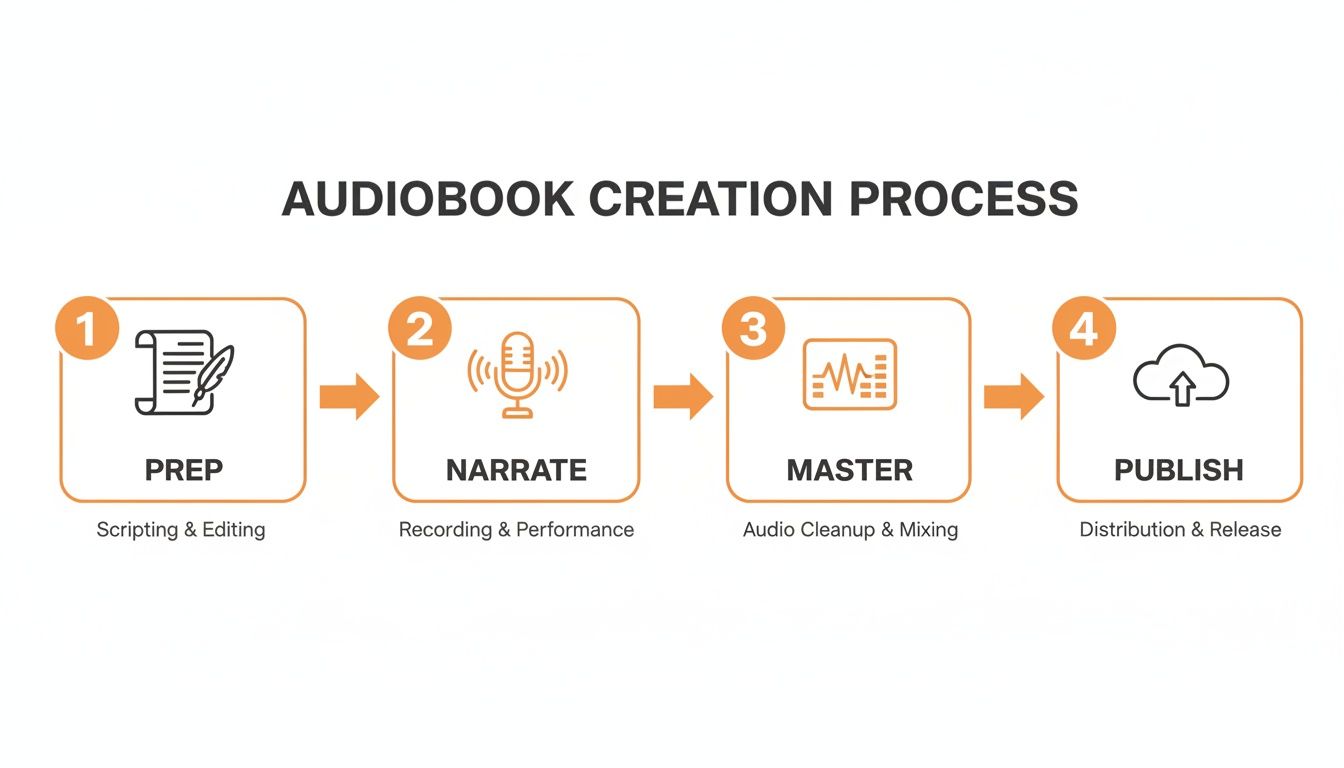
As you can see, each stage builds on the one before it, leading you from a prepared script all the way to a published audiobook.
Think of this guide as your complete roadmap. We're skipping the fluff and diving straight into actionable steps, practical advice, and even code snippets for every stage. Whether you opt for a human narrator to capture subtle emotion or a powerful TTS API for speed and scale, you'll find what you need to get it done right.
To see how technology is changing publishing on a broader scale, check out this ultimate guide to AI book translation for more insights.
The question is no longer if you should create an audiobook, but how you're going to do it efficiently. The tools available today put professional-grade production within reach for everyone.
Below is a quick overview of how the traditional path compares to a more modern, tech-driven approach.
This table breaks down the key stages of audiobook creation, comparing the old-school way with a faster, API-driven workflow.
| Production Stage | Traditional Method | Modern API-Driven Method |
|---|---|---|
| Narration | Audition, hire, and manage human narrators (4-8 weeks). | Generate high-quality audio in minutes using a TTS API. |
| Audio Editing | Manually remove breaths, clicks, and mistakes. | Minimal to no editing needed; audio is generated cleanly. |
| Mastering & QA | Engineer applies effects; human proof-listens. | Automated mastering; use STT API for fast, accurate proofing. |
| Revisions & Updates | Costly and slow re-recording sessions with the narrator. | Instantly regenerate audio files with script changes. |
By understanding the key decisions at each step, you can build a workflow that fits your budget, timeline, and creative vision, turning your written work into a compelling audio experience people will love.
Before you ever hit record, your manuscript needs to be completely re-envisioned. Think of it less like a book and more like a script for a performance. This isn't just a simple proofread; it's about translating a document meant for the eyes into a clear, unambiguous guide for the ears.
Taking the time to do this right is the bedrock of a great audiobook. If you skip this prep work, you’re almost certainly signing up for expensive, time-consuming fixes later on.
Start with one last, meticulous proofread. Hunt down any typos, grammatical stumbles, or clunky sentences that would trip up a narrator. Here's a pro tip: read the entire manuscript out loud yourself. You'll immediately catch phrasing that looks fine on the page but sounds completely unnatural when spoken.
This whole process is about turning visual cues into audible direction. A simple dash (—) might be an abrupt interruption. An ellipsis (...) could be a thoughtful pause. Your script needs to spell these things out.
A clean manuscript is a great start, but the real magic is in adding a layer of specific guidance. You want to leave absolutely nothing to interpretation, which is especially important if you're using AI narration. An AI voice will read exactly what's on the page, without making any creative leaps.
This is where you create a dedicated narration script. It's your original text, but annotated with clear instructions.
[Anna, sounding worried]. This keeps the voices consistent and distinct, which is a lifesaver in a long story.[short pause] or [long pause] give you precise control over the rhythm of the narration.Getting the script right is the single most effective way to control the final audio quality. A well-prepared manuscript saves hours in editing and ensures the narrator's performance—or the AI's generation—aligns perfectly with your vision from the start.
With your narration script locked in, you can finally put together a realistic budget and timeline. The cost of producing an audiobook can swing wildly, so mapping everything out early prevents any nasty surprises down the road.
Your budget needs to cover every stage of the journey. Here are the main line items to consider:
By carefully planning these expenses alongside your script preparation, you build a solid foundation for a production process that’s smooth, predictable, and results in a polished audiobook you can be proud of.
The voice of your audiobook is everything. It’s not just about reading words aloud; it's the element that breathes life into your story, sets the tone, and keeps your listener hooked. The decision you make here—whether to go with a human narrator or a cutting-edge AI voice—is probably the most critical one you'll face. It will fundamentally shape your budget, your production timeline, and the final feel of your project.
Let's be clear: there's no single right answer, just a series of trade-offs.
Going with a professional voice actor is the traditional route, and for good reason. A talented narrator is an artist. They can inject subtle emotion into a line, nail the comedic timing of a joke, or create distinct, memorable voices for a dozen different characters. This human touch is often non-negotiable for complex fiction, character-heavy dramas, or any book where a nuanced performance is central to the experience.
But that level of artistry comes with a hefty price tag, both in time and money. Finding the right narrator, sifting through auditions, and then managing the recording and editing process can easily take weeks, if not months. The financial side can be a real hurdle, especially for indie authors and publishers.
This is where Text-to-Speech (TTS) technology has completely changed the landscape. Modern TTS isn't the robotic, monotone voice you might be imagining. Today's APIs offer a surprisingly powerful and efficient alternative. Instead of waiting weeks for an audio file, you can generate the audio for an entire book in just a few minutes.
This speed and efficiency make TTS a perfect fit for certain types of projects:
The numbers really tell the story. The U.S. audiobook market is projected to hit $2.2 billion by 2025, and accessibility is a huge part of that growth. This mirrors a similar debate in the writing world: AI content writing vs human writers.
A human narrator often requires 20-30 hours of work for every finished hour of audio, with costs running anywhere from $200 to $400 per finished hour. A TTS API, on the other hand, reduces that production time to mere minutes. This is a game-changer, especially in the non-fiction space, which is growing at 27.5% annually. (You can dig into more of these audiobook trends on IBISWorld).
To make the choice clearer, let's break down the key differences.
When you're weighing your options, it helps to see a direct comparison of what you're getting, what you're spending, and how long it will take.
| Factor | Human Narrator | TTS API (e.g., Lemonfox.ai) |
|---|---|---|
| Cost | $200 - $400+ per finished audio hour | Pennies per finished audio hour |
| Production Time | Weeks or months | Minutes to hours |
| Emotional Nuance | High; capable of complex character voices | Limited but rapidly improving |
| Consistency | Can vary slightly between sessions | Perfectly consistent every time |
| Revision Process | Can be slow and costly (re-records) | Instantaneous and inexpensive |
| Scalability | Low; limited by one person's schedule | Extremely high; can process vast amounts of text |
Ultimately, the right choice depends entirely on your content and your goals. For a gripping fantasy novel, a human narrator is probably worth the investment. For a series of technical manuals, a TTS API is the smarter, more efficient choice.
Choosing an AI voice doesn't mean you're stuck with a generic, one-size-fits-all reading. This is where Speech Synthesis Markup Language (SSML) comes in. SSML is a simple markup language, much like HTML, that you embed directly in your script to give the AI precise instructions.
Think of SSML as your director's notes for the AI. It allows you to move beyond the default robotic reading and inject a layer of human-like cadence and emphasis into the final audio.
With a few simple tags, you can tell the AI exactly how you want it to perform:
<break time="1s"/> to insert a dramatic pause after a key sentence.<phoneme alphabet="ipa" ph="sɪˈvɔːn">Siobhan</phoneme>.This level of control is what bridges the gap between raw automation and a polished, professional-sounding final product. It puts the creative power back in your hands.
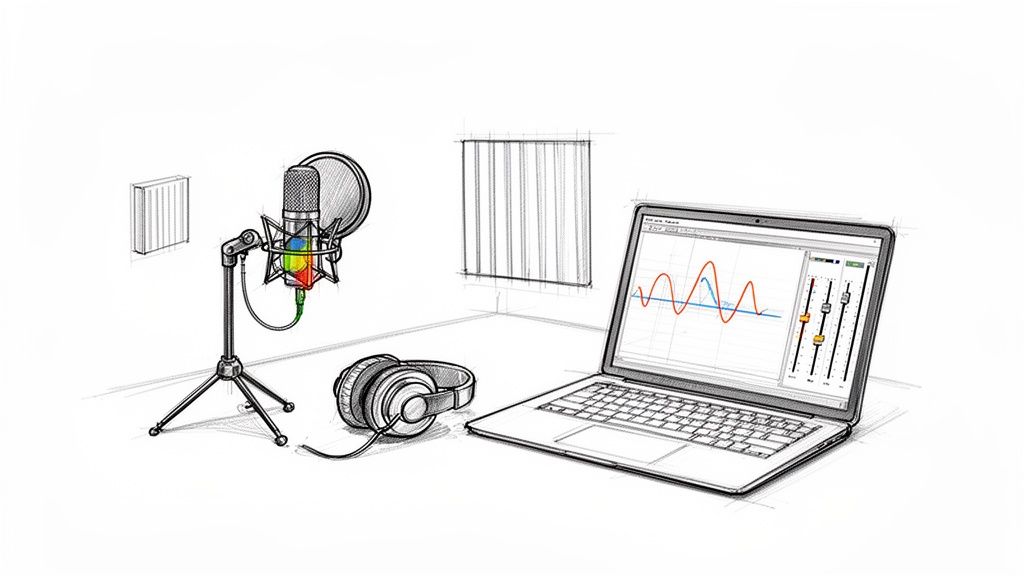
Whether you’ve just gotten audio files back from a narrator or generated them yourself with a Text-to-Speech API, that raw audio is only the beginning. It's the editing and mastering stages that really transform those recordings into a polished, professional product listeners will actually enjoy.
Let's be blunt: poor audio quality is the single fastest way to rack up bad reviews. This stage isn't optional.
The goal isn't just to make it sound nice, either. You have to meet the rigid technical requirements of distributors like ACX. They have strict, non-negotiable standards for things like volume, background noise, and file formatting. If you don't hit their marks, they’ll simply reject your audiobook, and you’ll be back to square one.
If you’re recording with a human narrator, you don't need to spend a fortune on a pro studio. You just need to control your recording environment. Your biggest enemy is background noise, so finding a quiet room is your most valuable asset.
Here’s what a solid, basic home recording setup looks like:
With your raw audio in hand, it's time to fire up your Digital Audio Workstation (DAW). Don't feel like you need expensive software—a free tool like Audacity is incredibly powerful and more than capable of handling professional audiobook work. Editing is all about cleaning up the performance.
This is where you'll spend your time on:
This detailed cleanup work is what separates an amateur audiobook from a professional one. It makes sure nothing pulls the listener out of the story.
Mastering is the final polish. It’s where you apply effects to the entire audio file to make it sound consistent, pleasant to listen to, and, most importantly, compliant with technical specs.
Think of mastering as the final, clear coat of varnish. You're not changing the content. You're just ensuring the volume and tone are perfectly balanced from the first word to the last for a smooth, uninterrupted listening experience.
You’ll be focusing on three key processes:
For ACX, which feeds into Audible, your files must meet these exact numbers:
By methodically editing your audio and then mastering it to these precise specifications, you all but guarantee your audiobook will sound fantastic and sail through the technical review process without a hitch.
Let's be honest, manually proof-listening hours upon hours of audio is a soul-crushing task. It’s not just tedious; it's expensive and a perfect recipe for human error. For developers or anyone comfortable with APIs, there’s a much smarter way to handle quality control. You can build a clever automated loop that does the heavy lifting, ensuring a flawless final product before it ever reaches a listener's ears.
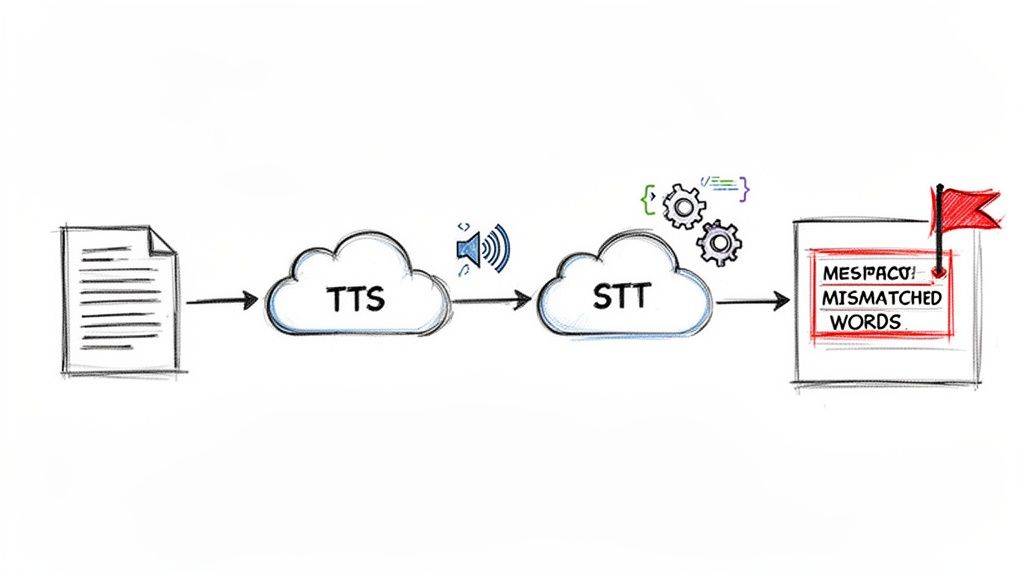
The core idea is beautifully simple: use a Text-to-Speech (TTS) API to create your audio, and then immediately use a Speech-to-Text (STT) API to check its work. By programmatically comparing the new transcription against your original manuscript, you can instantly flag any mistakes.
First things first, you need to turn your written manuscript into audio files. Using a service like Lemonfox.ai, this is just a straightforward API call. The process involves sending your text—usually chapter by chapter or in smaller chunks—and specifying which voice and format you want.
Here’s a quick Python example of how you might generate a single audio file from a line of text:
import requests
API_KEY = 'YOUR_LEMONFOX_API_KEY' TEXT_TO_CONVERT = "This is the first sentence of chapter one." VOICE_ID = 'sarah' # Example voice
response = requests.post( "https://api.lemonfox.ai/v1/audio/speech", headers={"Authorization": f"Bearer {API_KEY}"}, json={ "text": TEXT_TO_CONVERT, "voice_id": VOICE_ID } )
if response.status_code == 200: with open('chapter_01_part_01.mp3', 'wb') as f: f.write(response.content) print("Audio file generated successfully.") else: print(f"Error: {response.status_code} - {response.text}")
This little script takes a piece of text, sends it off to the Lemonfox.ai endpoint, and saves the MP3 it gets back. To produce the entire audiobook, you'd just wrap this logic in a loop, feeding it your manuscript one logical piece at a time.
Once your audio files are generated, the real magic begins. You take those same files and feed them right back into an STT API to get a fresh transcription. Think of this step as your tireless, machine-powered proof-listener.
This kind of automation is becoming essential. The global audiobook market, valued at USD 5.3 billion in 2023, is projected to explode to USD 39.1 billion by 2032. This growth is fueled by the 4.3 billion smartphone users who listen on the go, making scalable production methods a must. For a deeper dive into these numbers, check out the analysis from Mordor Intelligence.
Services with pricing like Lemonfox.ai's STT—under $0.17/hour with a 30-hour free trial—are built for exactly these kinds of cost-effective, automated pipelines.
Here’s how you’d transcribe the audio file you just made:
files = {'file': open('chapter_01_part_01.mp3', 'rb')}
response = requests.post( "https://api.lemonfox.ai/v1/audio/transcriptions", headers={"Authorization": f"Bearer {API_KEY}"}, files=files )
if response.status_code == 200:
transcribed_text = response.json().get('text')
print("Transcription complete.")
else:
print(f"Error: {response.status_code} - {response.text}")
Now you have a variable, transcribed_text, that holds exactly what the STT API heard in your audio file.
This dual-API strategy creates a powerful validation system. It systematically checks if the generated audio perfectly matches the source text, catching subtle pronunciation errors or skipped words that a human might easily miss during a long listening session.
The final step is the comparison. You can use a standard Python library like difflib to programmatically highlight every single difference between your original text and the newly transcribed version.
Any mismatch it finds is a red flag—a potential error. This could be anything from a mispronounced name or a word the TTS engine skipped to a weird audio artifact. Instead of listening to ten hours of audio, you get a clean, concise list of potential problems to investigate. This completely changes the game for your quality assurance process, especially when you need to create audiobooks at scale.
With your final audio files in hand, you've reached the last leg of the journey: putting your audiobook in front of listeners. This is where you'll wade into the world of distribution, and it really comes down to one big decision. Will you go all-in with a single, massive platform, or will you cast a wider net?
There’s no one-size-fits-all answer here. Each approach has its own set of pros and cons that can seriously affect your sales and how many people you reach. It’s about figuring out what makes the most sense for you.
The most popular exclusive route is through ACX (Audiobook Creation Exchange). As Amazon's platform, it’s the direct pipeline to Audible and iTunes, which are the biggest players in the game. The main draw? A higher royalty rate, usually 40%, if you agree to sell only with them. That’s a pretty sweet deal when you consider just how much of the market Audible owns. Of course, the trade-off is just as clear: your audiobook won’t be available anywhere else.
The other option is to go "wide." This means using an aggregator—think Findaway Voices or PublishDrive—to push your audiobook to a whole bunch of different stores and services. We're talking about places like:
Going wide gives you maximum exposure, reaching listeners who might never touch Audible. The catch is that your royalty rate will likely be lower since the aggregator needs to take its slice of the pie.
This is a strategic choice. Going exclusive with ACX is a bet on capturing a huge audience for a bigger cut of each sale. Going wide is more of a long-term play to build your presence everywhere, including the incredibly valuable library market.
No matter which path you take, you'll need to get your submission package in order. These platforms are sticklers for rules, and having everything ready from the get-go will save you a ton of headaches and potential rejections.
Here’s your pre-flight checklist:
Hitting "publish" isn't the finish line. To get things moving, you need to drum up some early reviews and get some eyeballs—or ears—on your audiobook. You don't need a massive marketing budget, just a few smart moves.
A great place to start is with the free promotional codes that distributors like ACX hand out. Offer these to your email subscribers, social media crowd, or a small group of superfans you've designated as a "launch team." The goal is to get those first few honest reviews up as quickly as possible. Those early reviews act as social proof and give the platform's algorithm a nice little nudge.
One author shared a great breakdown of how she used promo codes from ACX to build that crucial initial buzz. By being thoughtful about your distribution, meticulous with your files, and smart with your launch, you can give your audiobook the best possible chance to succeed.
If you're just starting to figure out how to create an audiobook, you've probably got a few questions. Here are the answers to some of the ones I hear most often.
This is the big one, and the answer really is "it depends." The path you choose completely dictates your budget.
If you go the traditional route and hire a professional narrator, you're looking at a serious investment. For an average-length book, expect to pay anywhere from $1,000 to over $5,000. That fee typically covers the narrator's performance, studio time, and maybe some light editing.
On the other hand, using a modern Text-to-Speech API can bring the cost of pure audio generation down to just a handful of dollars. Your main expenses then become things like cover art design, any editing you can't do yourself, and distribution fees. It’s a game-changer for accessibility.
Just like with cost, the timeline is all about your production method.
Working with a human narrator is a partnership that requires patience. Between their schedule, the actual recording, and the back-and-forth for edits and approvals, the process can easily stretch across several weeks, sometimes even months.
A TTS API, in stark contrast, can generate the raw audio for an entire novel in less than an hour. After that, the clock is in your hands. Your total project time will be determined by how meticulous you are with your quality checks, mastering, and final polish.
The Bottom Line: The decision really boils down to a trade-off between time and money. Human narration costs more and takes longer, but it delivers a unique, emotional performance. TTS is incredibly fast and affordable, which is perfect for non-fiction, technical guides, or just getting your work out there quickly.
Absolutely! This is a fantastic way to breathe new life into content you’ve already created. Bundling a series of related blog posts or technical articles into a single, cohesive audiobook is a smart strategy for creating a new product without starting from scratch.
Just be sure to review the text and edit it so it flows naturally when read aloud. And, of course, double-check that you own all the rights to the material before you start.
Not necessarily anymore. While having some basic coding knowledge to make an API call is certainly helpful for a custom setup, the landscape is getting much more user-friendly.
For developers, the documentation for most APIs is straightforward. For everyone else, we're seeing more and more tools and platforms that provide a simple interface, letting you access the power of the API without writing a single line of code.
Ready to build your audiobook with incredible speed and at a fraction of the traditional cost? Lemonfox.ai provides the market's most cost-effective Text-to-Speech and Speech-to-Text APIs, giving you the perfect foundation for an automated production workflow. See what's possible at https://www.lemonfox.ai.