
First month for free!
Get started
Published 1/4/2026

Learning how to make an API key is one of the first things you'll do when hooking your app up to a service like Lemonfox.ai. Think of this key as a digital passport for your project. It’s what gives you secure, controlled, and trackable access to powerful features, from speech-to-text transcription to AI-powered voice generation.
Before we get into the "how," let's quickly cover the "why." An API key is far more than just a long, random string of characters. It’s the essential link that connects your code to external services, solving a bunch of critical problems in software development right out of the box.
Imagine you're building an app that transcribes customer service calls using Lemonfox.ai. Your API key is what tells the service, "Hey, this request is from a legitimate, authorized application." This simple step prevents random, unauthorized actors from using your account and racking up charges.
At its heart, an API key is doing a few vital jobs for you behind the scenes. It handles everything from confirming your app's identity to making sure you're billed correctly.
Here’s a breakdown of the three main roles an API key plays in keeping everything running smoothly and securely.
| Function | What It Does for You | Why It's Critical for Your Project |
|---|---|---|
| Authentication & Authorization | Confirms your app is a known client with permission to access specific resources. | This is your first line of defense. It stops unauthorized access and protects your data and account from misuse. |
| Usage Tracking & Billing | Lets the provider monitor how many API calls you make and when. | Ensures fair billing based on consumption and helps enforce rate limits, preventing a single rogue script from overwhelming the system. |
| Access Control (Scoping) | Allows you to assign specific, limited permissions to different keys. | You can create a "read-only" key for a public demo or a "full-access" key for a secure backend service, minimizing your security risk. |
Each of these functions is essential for building a robust, secure application. The key acts as the trusted handshake between your project and the API provider.
Your API key is the contract between your application and the service it’s using. It establishes trust, sets boundaries, and enables measurement—all foundational elements for secure and scalable software.
The skill of creating and managing API keys has become central to modern development. The global API management market, valued at USD 12.16 billion, is expected to explode to USD 169.33 billion by 2034. That’s a staggering compound annual growth rate (CAGR) of 34.00%, underscoring just how critical secure API access has become.
For anyone working with Lemonfox.ai's Speech-To-Text API, these keys are what grant you access to over 100 languages with speaker recognition for less than $0.17 per hour.
Ultimately, knowing how to properly generate and handle your API keys isn't just a box-ticking exercise. It's a core practice that feeds directly into practical tips for improving overall developer productivity by creating safer, more efficient workflows. You simply can't build a modern, connected application without it.
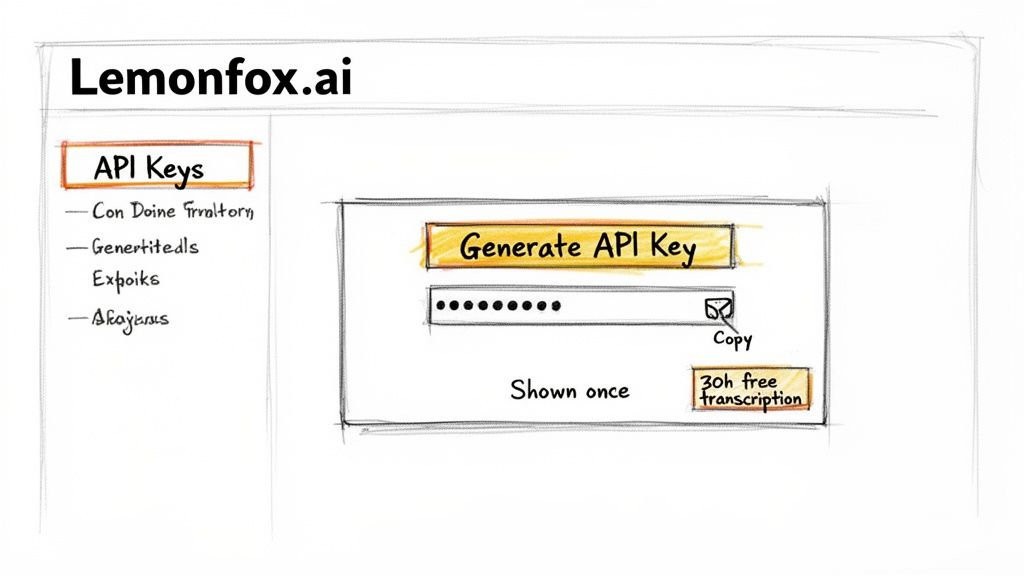
Alright, enough theory. Let's get our hands dirty and actually make an API key. This is usually the first real interaction you have with a new service, and thankfully, Lemonfox.ai keeps it simple. The goal here is to get that all-important credential that unlocks your 30 hours of free speech-to-text transcription.
This quick-start process is becoming the norm. The AI API market is booming—it was valued at USD 44.41 billion and is expected to climb to USD 179.14 billion. In a space moving that fast, developers can't afford to wait. Getting a key in under a minute isn't just a nice-to-have; it's essential for keeping projects moving. You can dive deeper into the growth of the AI API market if you're curious.
First things first, you'll need a Lemonfox.ai account. After you sign up and verify your email, you'll be dropped into your main dashboard. Think of this as your command center for everything—managing projects, checking your usage, and, of course, creating API keys.
On the left side of the screen, you’ll spot a navigation menu with the usual suspects: "Dashboard," "Billing," etc. The one we're looking for will be labeled "API Keys" or maybe "Developer."
Here’s a glimpse of the developer portal where the magic happens.
As you can see, it's a clean, no-nonsense interface designed to get you where you need to go without any fuss.
Once you’re in the API Keys area, a big button labeled something like "Create new key" or "Generate API Key" will be waiting for you. Go ahead and click it.
After you click to create a new key, the system will ask you to give it a name. Don't skip this or give it a generic label. Taking a few seconds here will save you a lot of headaches later.
Once you’ve named your key and confirmed, the system will generate your new credentials, including a secret key.
Critical Takeaway: Copy your secret key immediately and store it somewhere safe. For security reasons, Lemonfox.ai will only show this to you once. If you lose it, it's gone for good. You'll have to revoke the old key and create an entirely new one.
This "show-once" policy is a standard security measure that protects your account. Treat this key with the same care you would a password. That means never, ever committing it to a public GitHub repository or exposing it in your front-end code.
With your new key safely tucked away, you're ready to start building.
You’ve generated and saved your API key. Now for the fun part: actually using it to connect your project to Lemonfox.ai. An API key is just a long string of characters until you plug it into your application to fetch data or kick off a process.
Let's walk through a few common ways to do this. Whether you're a Python developer, a JavaScript pro, or just want to run a quick test from your terminal, these examples will get you going in minutes.
Before we dive into the code, we need to talk about the single most common (and dangerous) mistake I see developers make: hardcoding API keys directly into their scripts. It feels quick and easy for a test, I get it. But it's a huge security risk.
Accidentally commit that file to a public GitHub repo, and your key is out there for anyone to find and abuse. Trust me, it happens faster than you think.
The professional approach is to use environment variables. This keeps your sensitive credentials completely separate from your codebase. Your script can access the key when it needs to, but the key itself never lives inside your code files.
Think of it this way: your code is the recipe, and your API key is the key to your pantry. You wouldn't write the key's combination directly on the recipe card for everyone to see. Loading it from an environment variable is like grabbing the key from a secure lockbox right when you need it.
Let's look at how this plays out in practice. The difference is subtle but critical for building secure software.
The fastest way to confirm your new key is working is with a simple cURL command. It lets you send a direct request to the API right from your command line, no script needed.
First, you need to set the key as an environment variable in your current terminal session. For Linux or macOS, the export command does the trick.
export LEMONFOX_API_KEY="your_api_key_here"
With that set, you can now reference it in your cURL command using $LEMONFOX_API_KEY. Notice how the actual key isn't pasted into the command itself.
curl -X POST "https://api.lemonfox.ai/v1/speech"
-H "Authorization: Bearer $LEMONFOX_API_KEY"
-H "Content-Type: application/json"
-d '{ "audio_url": "YOUR_AUDIO_FILE_URL" }'
If everything is configured correctly, the Lemonfox.ai API will send back a JSON response. That's your confirmation that the key is active and properly authorized.
Now for a more permanent integration inside a Python application. We’ll use the fantastic requests library to handle the HTTP call and the built-in os module to securely access our environment variable.
The Wrong Way (Hardcoded):
import requests
api_key = "lf-1234567890abcdef1234567890abcdef" # DANGEROUS!
headers = {"Authorization": f"Bearer {api_key}"}
The Right Way (Environment Variable):
import os
import requests
api_key = os.getenv("LEMONFOX_API_KEY")
if not api_key:
raise ValueError("API key not found. Please set the LEMONFOX_API_KEY environment variable.")
headers = {
"Authorization": f"Bearer {api_key}",
"Content-Type": "application/json"
}
response = requests.post("https://api.lemonfox.ai/v1/speech", headers=headers)
print(response.json())
See the difference? The second example is far more robust and secure. It cleanly separates your configuration (the key) from your code, making your application safer and easier to deploy in different environments.
Once you’ve generated an API key, the real work begins. Creating the key is the easy part—it's how you protect it throughout its lifecycle that truly defines your application's security posture. This is where experienced developers really shine, moving past basic storage to implement security controls that are both robust and practical.
The diagram below maps out the typical journey for a new API key, from the moment it's created to its first use in your application.

Notice the critical step here is securing the key before it ever gets near your application's codebase. This one habit prevents countless security headaches down the road.
One of the most foundational concepts in security is the Principle of Least Privilege. Simply put, an API key should only have the bare-minimum permissions it needs to do its job, and nothing more. This simple rule drastically shrinks your potential attack surface.
If a key’s only purpose is to read data, it should never have permission to write or delete anything. Platforms like Lemonfox.ai make this easy by letting you configure specific scopes for each key.
By carefully tailoring these permissions, you ensure that even if a key is somehow compromised, the damage is contained. The intruder is walled off from any part of the system the key wasn't meant to access in the first place.
Using environment variables is a solid starting point, but for anything beyond a hobby project, you need something more powerful. Production-grade applications rely on dedicated secrets management tools like AWS Secrets Manager or HashiCorp Vault.
These services provide a centralized, secure, and auditable way to handle your keys, offering features that a simple .env file just can't compete with. Think encrypted storage, fine-grained access policies, and even automated key rotation.
An environment variable is like hiding your house key under the doormat. A secrets manager is like keeping it in a bank's safe deposit box, complete with security guards and identity checks.
To truly embed security into your workflow, it helps to understand the Secure System Development Life Cycle (SDLC). This approach weaves security checks into every stage of development, from initial design all the way through deployment and maintenance.
API keys should never be treated as permanent fixtures. Just like you might change the locks on your house, you need to rotate your API keys on a regular schedule. Key rotation is the simple act of retiring an old key and replacing it with a fresh one.
This isn't a new idea. The entire history of API authentication, from basic HTTP to modern token-based systems, is a story of ever-increasing security needs. It's a critical part of an API marketplace projected to hit USD 49,453.6 million with an 18.9% CAGR. Services like Lemonfox.ai are built on this foundation, offering streamlined key management that aligns with modern best practices.
Here's a quick reference guide to keep your habits in check.
| Practice | What You Should Do | What You Must Avoid |
|---|---|---|
| Storage | Use a dedicated secrets manager (e.g., AWS Secrets Manager, HashiCorp Vault). | Never hardcode keys in your source code or commit them to Git. |
| Permissions | Apply the Principle of Least Privilege. Only grant necessary scopes. | Creating "god-mode" keys with full access for convenience. |
| Rotation | Set a regular rotation schedule (e.g., every 90 days) and automate it. | Using the same key indefinitely ("set it and forget it"). |
| Monitoring | Log and audit API key usage to detect suspicious activity. | Ignoring logs or having no way to track key usage. |
| Transmission | Always transmit keys over encrypted channels (HTTPS). | Sending keys over unencrypted HTTP or in URL parameters. |
By following the "Do's" and steering clear of the "Don'ts," you build a much more resilient and secure system.
Setting up a rotation policy is a straightforward, four-part process:
Sooner or later, even with a perfectly generated API key, you're going to hit an error. It’s a rite of passage for every developer. These hiccups can be frustrating, but they’re almost always simple to fix once you know what to look for. Let's walk through the most common culprits so you can get back to building.
This is usually the first one you'll meet. A 401 Unauthorized error is the API's way of saying, "I have no idea who you are." This isn't about what you're allowed to do; it's about whether the server can even recognize you. Your identity is the problem.
When a 401 pops up, your first instinct should be to check for simple mistakes.
Authorization: Bearer YOUR_API_KEY. Forgetting the "Bearer" prefix is a classic mistake..env file, quickly print() or console.log() it to be sure it isn't undefined or null.A 403 Forbidden error is a different beast entirely. In this case, the server knows exactly who you are—the key is perfectly valid—but it has decided you don't have the permission to do what you're asking. This is an authorization issue, not an authentication one.
I like to think of it like using your employee keycard to get into the CEO's office. The building recognizes your card, but your access level just isn't high enough for that particular door.
Pro Tip: A
403is your cue to go back and review the scopes you assigned when you first decided to make an API key. It’s highly likely you created a key with read-only access when you actually needed write permissions.
Jump back into your Lemonfox.ai dashboard and take a close look at the key’s permissions. Make sure it has the right scopes, like access to the Text-to-Speech API, for the specific endpoint you’re trying to hit.
Finally, there's the 429 Too Many Requests error. This one means your key is valid and you have the right permissions, but you're just calling the API too frequently. APIs use rate limits to maintain stability for everyone. Hitting this limit isn't a bug; it's a built-in protection.
The go-to solution here is implementing an exponential backoff strategy in your code.
If a request fails with a 429, don't just immediately try again. Instead, wait for a brief moment—say, 1 second—before retrying. If it fails again, double the wait time to 2 seconds, then 4, and so on. This polite approach gives the server a breather and dramatically increases the chance your subsequent requests will succeed.
Even with a perfect plan, you're bound to have questions when you start working with API keys. It's just part of the process. Let's tackle some of the most common ones I hear from developers to clear things up.
This one trips people up all the time, but the distinction is pretty straightforward once you get it.
Think of an API key as a permanent key to a specific building. It identifies your application as a legitimate entity trying to access the service. It’s a simple, long-lasting string that’s perfect for server-to-server communication where your app is the one making the calls.
An OAuth token, on the other hand, is more like a temporary visitor's badge given to a specific person. It represents a user's consent for your app to access their data for a limited time. It’s more complex to set up, but it's the gold standard for security when your application needs to act on a user's behalf.
First, don't panic, but you absolutely must act fast. A leaked key is a serious security incident, and your immediate response is critical.
The second you even suspect a leak, treat it as a real one. Your top priority is to invalidate the key. Waiting just a few minutes can be the difference between a close call and a major disaster.
I’m going to be blunt: absolutely not. Using the same key for development and production is a tempting shortcut, but it's a massive security risk you don't want to take.
Always, always create separate keys for each environment. This simple step gives you crucial isolation. It means you can set much tighter permissions and lower rate limits for your dev and staging environments without affecting your live product.
More importantly, if a key gets compromised in your less-secure development environment (which happens!), your live, customer-facing application is completely safe. It’s one of the easiest and most effective security habits you can build.
Ready to build with fast, affordable, and secure APIs? Get started with Lemonfox.ai and claim your 30 hours of free transcription to see the difference for yourself. Get your free API key now.