
First month for free!
Get started
Published 1/18/2026
Remember those clunky, monotone computer voices from a decade ago? They were functional, sure, but they had none of the warmth or subtlety of a real human speaker. We've come a long way since then.
Modern text-to-speech (TTS) has moved far beyond that robotic past. Today's systems use complex neural networks trained on massive datasets of human speech to generate audio that's not just clear, but genuinely engaging.
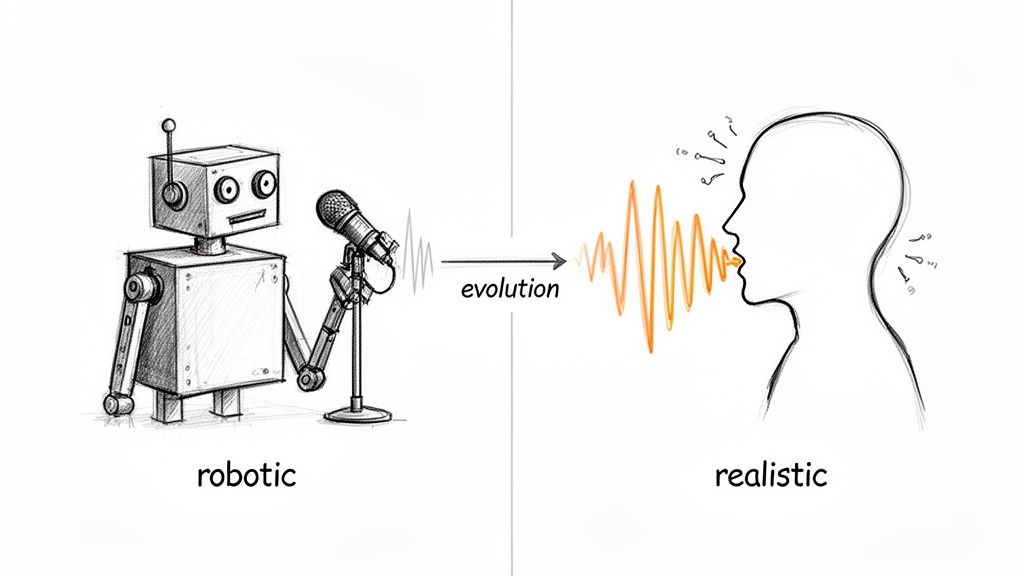
The real magic isn't just about getting the pronunciation right. It's about nailing the prosody—the rhythm, the stress patterns, and the intonation that make speech feel alive. A top-tier TTS engine can understand context, know which words to emphasize, and even insert natural pauses, creating audio that can be genuinely compelling to listen to.
For those of us building applications, lifelike audio has shifted from a "nice-to-have" feature to a core part of the user experience. High-quality, natural-sounding speech can make a huge difference in engagement and usability across the board.
Think about the possibilities:
To get this right, developers need to think like a director, controlling the various elements that make up a vocal performance.
Here’s a quick breakdown of the core components you'll be working with to shape the audio output.
| Component | Description | Developer Control Method |
|---|---|---|
| Voice | The unique identity of the speaker, including gender, age, and accent. | API parameter (e.g., selecting a specific voice_id). |
| Prosody | The rhythm, stress, and intonation of speech. It dictates the emotional tone. | Speech Synthesis Markup Language (SSML) tags for emphasis, pitch, and rate. |
| Pacing | The speed of speech and the length of pauses between words or sentences. | SSML tags like <break> and attributes on <prosody>. |
| Emotion | Conveying feelings like happiness, sadness, or excitement through vocal delivery. | Voice models specifically trained for different emotional styles. |
Mastering these elements is what separates a basic text-to-audio conversion from a truly polished and professional result.
The demand for this technology is exploding. The global text-to-speech market is projected to grow from USD 3.6 billion in 2023 to USD 14.6 billion by 2033. You can dig into more of the market growth data at Market.us. This isn't just a niche tool anymore; it's becoming foundational.
This guide is all about getting your hands dirty. We'll walk through practical, actionable steps using the Lemonfox.ai API as our main example. We’ll cover everything from simple text conversion to fine-tuning a rich vocal performance, all while keeping an eye on performance and cost. Let's dive in.
Alright, let's move from theory to code. This is where the magic happens and you actually get to hear the results of your work. We're going to make our first API call to generate some text to realistic speech using the Lemonfox.ai API. I'll show you how to get your first audio file back in just a few minutes.
The process kicks off with authentication. Like pretty much any API worth its salt, Lemonfox.ai uses an API key to make sure requests are coming from you. It's just a unique string you'll stick in your request header to identify your application.
Before you can write a single line of code, you'll need a couple of things squared away.
Once you've got those two things, you're ready to make your first request. At its core, all we're doing is sending a POST request to the Lemonfox.ai endpoint. That request will contain a JSON payload with the text we want to convert, the voice we want to use, and a few other details.
Here’s a simple diagram that shows the basic workflow.
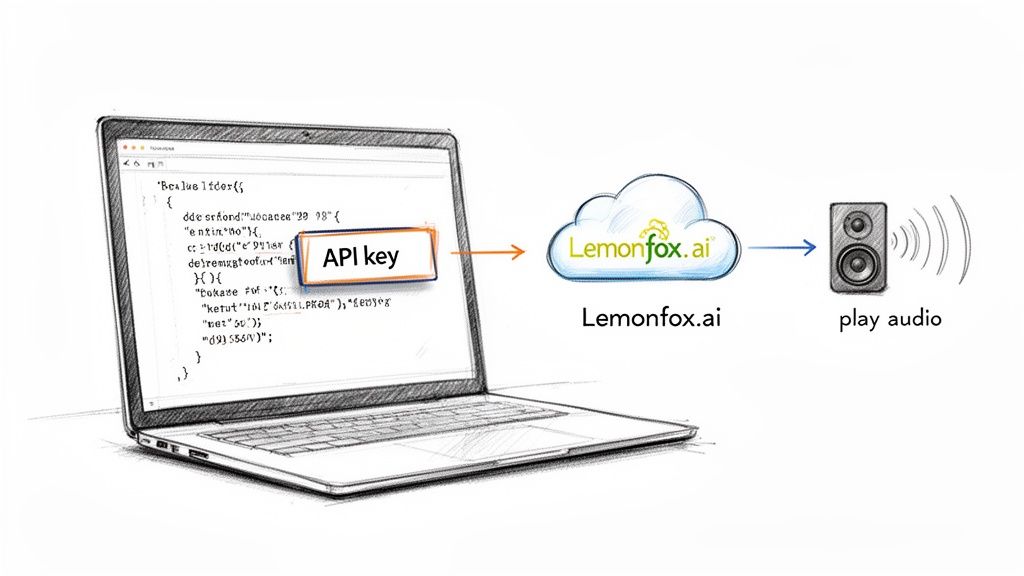
It really is that straightforward: your app sends text and settings, and the API sends back an audio file.
Python is a fantastic language for this kind of work, especially for backend scripts and services. If you haven't already, you'll need the requests library. You can install it with a quick pip install requests in your terminal.
Here’s a dead-simple Python script to turn a sentence into an MP3 file.
import requests
API_KEY = "YOUR_LEMONFOX_API_KEY"
API_URL = "https://api.lemonfox.ai/v1/audio/speech"
headers = {
"Authorization": f"Bearer {API_KEY}",
"Content-Type": "application/json"
}
payload = {
"model": "lemon-english-v1",
"input": "Hello, world! This is my first test of generating realistic speech from text.",
"voice": "alloy" # Other voices include: echo, fable, onyx, nova, shimmer
}
response = requests.post(API_URL, headers=headers, json=payload)
if response.status_code == 200:
# Save the audio content to a file
with open("output.mp3", "wb") as f:
f.write(response.content)
print("Success! Your audio file 'output.mp3' has been generated.")
else:
print(f"Bummer. Something went wrong: {response.status_code}")
print(response.text)
Run that script, and if everything goes well, you’ll find an output.mp3 file in your project folder. Give it a listen!
For all the JavaScript developers out there, the process is just as easy. We'll use axios for this example, a popular HTTP client. If it's not already in your project, just run npm install axios.
Here's how you'd make the same request in Node.js.
const axios = require('axios');
const fs = require('fs');
const path = require('path');
const API_KEY = "YOUR_LEMONFOX_API_KEY";
const API_URL = "https://api.lemonfox.ai/v1/audio/speech";
const headers = {
"Authorization": Bearer ${API_KEY},
"Content-Type": "application/json"
};
const payload = {
"model": "lemon-english-v1",
"input": "Hello, world! This is my first test of generating realistic speech from text.",
"voice": "alloy"
};
const speechFile = path.resolve('./output.mp3');
async function main() {
try {
const response = await axios.post(API_URL, payload, {
headers,
responseType: 'stream'
});
    const writer = fs.createWriteStream(speechFile);
    response.data.pipe(writer);

    return new Promise((resolve, reject) => {
        writer.on('finish', resolve);
        writer.on('error', reject);
    });

} catch (error) {
    console.error("API Error:", error.response ? error.response.data.toString() : error.message);
}
}
main().then(() => {
console.log("Success! Your audio file 'output.mp3' has been generated.");
});
Key Takeaway: Notice how simple the initial integration is. You only have to define the text (
input), the model (model), and a specific voice (voice). This is the foundation you'll build on as you start playing with more advanced features like SSML for finer control.
With just a few lines of code, you’ve gone from plain text to a high-quality audio file. Now the fun begins—tailoring that audio to perfectly suit your application's tone and context.
Picking the right voice is about so much more than just clarity. You're actually defining the personality of your entire application. Think about it—this voice becomes the primary touchpoint for your users, the very sound of your brand. Getting it wrong can make your app feel jarring or untrustworthy, but the right one builds an instant connection.
So, what's the goal of your audio? Is it for a fast-paced news reader that needs a crisp, authoritative tone? Or are you building a meditation guide that requires a calm, soothing voice? Each of those scenarios demands a completely different vocal persona to actually work.
Before you even listen to a single sample, take a step back and look at your brand. What are its core attributes? Is it playful and energetic, or buttoned-up and professional? Your chosen voice has to be a direct extension of that identity.
A mismatch here can be really confusing. Imagine a serious banking app that greets you with a whimsical, cartoonish voice—it would instantly kill the sense of security you're trying to build. The very first step is always aligning the voice with your established brand persona.
The secret to creating truly believable text to realistic speech is matching the voice to the context. A voice that's perfect for a long-form audiobook might fall completely flat as a real-time virtual assistant, where you need responsiveness and immediate clarity above all else.
Next, think about who's listening. The demographics and expectations of your audience play a huge role. A voice for a kids' educational game should be friendly, patient, and full of encouragement. On the other hand, an app giving technical instructions to engineers needs a voice that's direct, clear, and articulate.
Here are a few common scenarios I've seen:
The tech behind these voices has come a long way. These days, neural text-to-speech is what you'll find powering most services, and it accounted for the largest revenue share back in 2023. These modern models can hit naturalness scores above 95% in listener tests, which is what makes these kinds of nuanced voice selections possible in the first place. If you're curious, you can dig into the data on this market shift at Research and Markets.
Ultimately, choosing a voice is an art, but it's an art guided by strategy. By carefully thinking through your brand, your audience, and the specific job the voice needs to do, you can pick one that doesn't just deliver information, but actually improves the user experience and builds real trust.
Getting the text-to-speech engine to generate audio is the easy part. The real magic happens when you start directing the vocal performance, turning flat, robotic sentences into speech with real rhythm, emotion, and impact. This is where Speech Synthesis Markup Language (SSML) comes in—it's your most critical tool.
Think of plain text as a script with zero stage directions. The TTS engine reads the words, sure, but it's just guessing at the intent. SSML lets you embed those crucial directions right into your text, telling the AI voice exactly how to deliver each line. It’s the difference between a simple reading and a compelling performance.
Let's move beyond theory and look at a real-world scenario. Imagine you're producing a podcast intro and need to build a bit of drama.
You'd be surprised how much a simple pause can do. Using the <break> tag, you can control the timing of your audio down to the millisecond—something punctuation alone just can't handle. A comma offers a standard, short pause, but what if you need the silence to hang in the air for a moment longer?
Take this simple intro script:Welcome to Tech Unfiltered. In this episode, we uncover the truth.
The delivery is okay, but it feels rushed. Now, let’s add some SSML to direct the timing:<speak>Welcome to Tech Unfiltered. <break time="1s"/> In this episode <break time="500ms"/> we uncover the truth.</speak>
That one-second pause after the show’s title lets the name sink in. The shorter, half-second pause right before the final clause builds a little suspense. Just like that, you've used timing to add a layer of professional polish that makes the whole thing feel more engaging.
Before you even get to directing with SSML, you have to pick the right voice. This is the foundation of the performance you're about to craft.
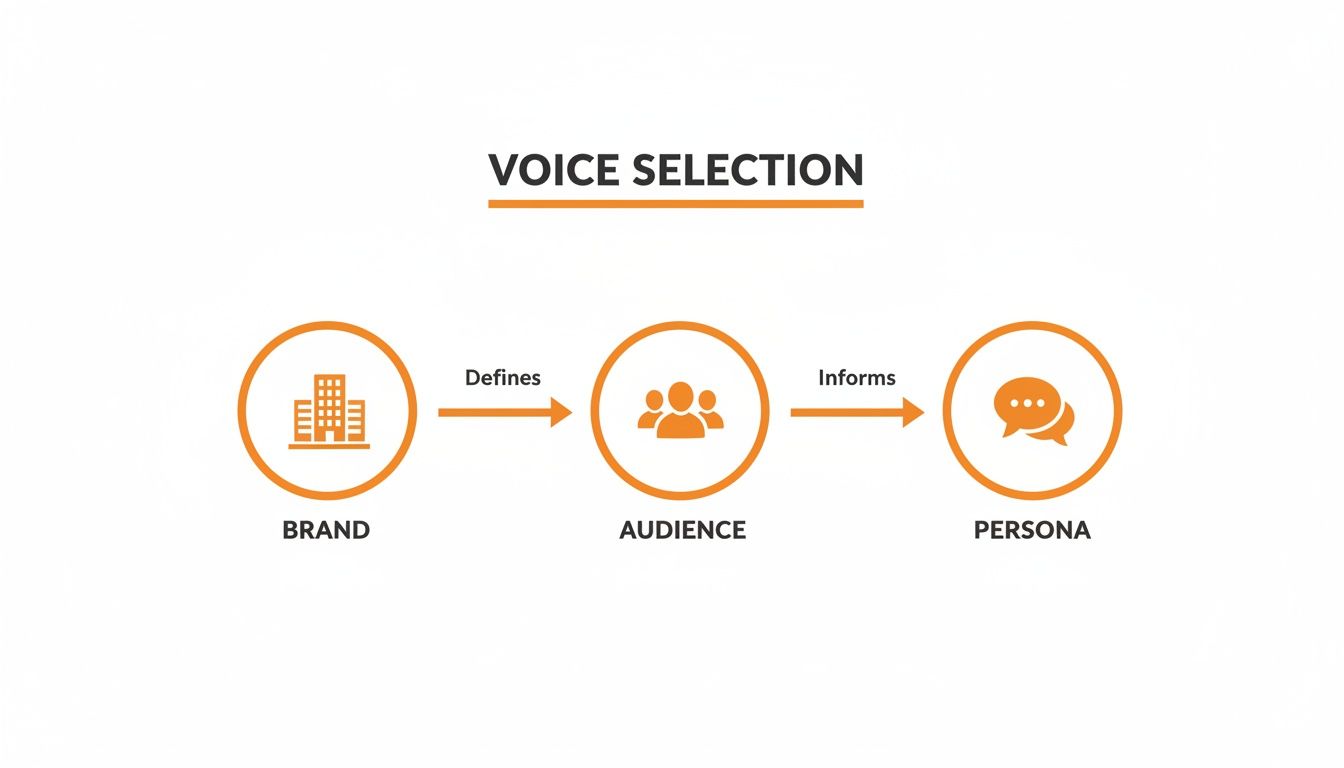
As you can see, the path is pretty straightforward: your brand's identity helps you understand your audience, which then points you toward the perfect voice persona for your project.
Ready to take it up a notch? The <prosody> tag is essentially your control panel for the voice's pitch, speaking rate, and volume. This is how you start injecting genuine emotion into the delivery.
Let's say you're building an e-learning module and need to sound excited about a new feature.
Here's the line without SSML:With our new update, you can now process data ten times faster!
And here it is with some direction:<speak>With our new update, you can now process data <prosody rate="fast" pitch="high">ten times faster!</prosody></speak>
By bumping up the rate and pitch just for the phrase "ten times faster," the voice suddenly sounds genuinely enthusiastic. It's a subtle change, but it makes a world of difference. On the flip side, you could use rate="slow" and pitch="low" to add a sense of gravity or seriousness to another part of your script.
My advice? Don't go overboard with prosody adjustments. Like any special effect, its power comes from contrast. Use it strategically on key phrases you want to stand out, rather than applying it to whole sentences, which can quickly make the speech sound unnatural and weird.
Sometimes, all you need is to make a single word pop. The <emphasis> tag is your best friend for this. It tells the TTS engine to put a little extra stress on a specific word or phrase, which can subtly shift the meaning and focus of the entire sentence.
Consider a line from a user tutorial:It is critical that you save your work before logging out.
To make sure the listener doesn't miss the most important instruction, you can add emphasis:<speak>It is <emphasis level="strong">critical</emphasis> that you save your work before logging out.</speak>
This tiny tweak draws the ear directly to the word "critical" without messing with the overall tone or pace. It’s a precision tool for guiding the listener’s attention, making your instructions clearer and far more effective.
To get the most natural-sounding speech, you'll want to get comfortable with the most common SSML tags. Here’s a quick rundown of the ones I find myself using most often and what they're good for.
| SSML Tag | Function | Use Case Example |
|---|---|---|
<break> |
Inserts a pause. | <break time="750ms"/> to create a dramatic pause between sentences. |
<prosody> |
Controls pitch, rate, and volume. | <prosody rate="slow" pitch="-10%">This is a serious matter.</prosody> |
<emphasis> |
Stresses a word or phrase. | This is <emphasis>absolutely</emphasis> essential. |
<say-as> |
Specifies how to interpret text. | Order #<say-as interpret-as="digits">12345</say-as>. |
<sub> |
Replaces a word with another. | <sub alias="World Wide Web">WWW</sub> to pronounce an acronym correctly. |
Mastering these tags is really what elevates a simple audio generation into a directed, nuanced, and truly realistic voice performance. It's the craft behind the code.
When your app moves from development to production, the game changes. Suddenly, every millisecond of latency and every penny spent on API calls really starts to matter. Your focus has to shift toward pure efficiency.
The goal is to serve up high-quality, text to realistic speech without keeping your users waiting or blowing up your budget. Thankfully, a few battle-tested strategies can dramatically improve both speed and cost. It really comes down to being smart about minimizing redundant work and choosing the right tools for the job.
Honestly, the fastest API call is the one you never make. This is where an intelligent caching strategy becomes absolutely essential for any serious application.
Think about all the text that gets repeated—things like UI prompts ("Main Menu"), standard greetings, or instructional clips. Generate the audio for these once, then store the file on a CDN or a local server. The next time a user needs that audio, you can serve it instantly from your cache. This simple trick practically eliminates latency and, of course, saves you an API call.
Another easy win that's often overlooked is server location. If most of your users are in Europe, hitting an EU-based endpoint, like the one offered by Lemonfox.ai, will noticeably cut down the network round-trip time.
A classic mistake I see is developers generating audio for static UI elements on every single page load. It's wildly inefficient. My rule of thumb is simple: if the text doesn't change, cache the audio. Using a hash of the text plus voice settings as a cache key makes lookups a breeze.
Caching is your biggest lever, but you can get even more granular with cost control by thinking about when and how you generate audio. Not everything needs to happen in real-time.
Batch Processing: Got a non-urgent job, like creating audio for your entire article archive or a new set of e-learning modules? Batch it up. You can send these requests as a single, large job, often during off-peak hours, which can improve throughput and sometimes even come with better pricing.
Audio Format Selection: The audio format you choose directly impacts file size. A high-bitrate WAV file delivers pristine quality, but a compressed format like MP3 is often perfectly fine for most applications. The smaller file means faster downloads for your users and lower bandwidth costs for you.
The demand for high-quality audio is exploding, with the TTS market projected to grow from USD 4.85 billion in 2025 to USD 9.36 billion by 2032. Platforms like Lemonfox.ai are meeting this demand with developer-first pricing that's a fraction of what major cloud providers charge, making it far easier to manage costs as you scale. You can discover more about TTS market growth. Putting these optimizations in place now ensures you're ready to grow with the market.
Once you start integrating text to realistic speech into a real-world application, you’ll inevitably run into a few common roadblocks. Getting from a simple "hello world" script to a production-ready system brings up practical questions about performance, quality, and user experience. Let's walk through some of the most frequent hurdles I see developers face and how to get past them.
The first big "aha!" moment for many developers is realizing the limitations of just sending a raw string of text to the API. It works, but it’s just the starting point.
Sending plain text is like handing an actor a script with no punctuation or stage directions. They'll say the words, but the delivery will be flat because the engine has to guess at the intended pacing, tone, and emphasis.
That's where SSML (Speech Synthesis Markup Language) comes in. Think of it as your director's notes. You can use simple tags to tell the voice exactly how to perform. Need a dramatic pause for effect? Use a <break> tag. Want to emphasize a specific word? The <prosody> tag lets you tweak the pitch and speed. This is what separates a stiff, robotic voice from one that sounds genuinely human and engaging.
I’ve found that the biggest wins in audio quality come from tiny, well-placed SSML adjustments. A simple 500ms pause after a question or a slight change in rate on a single phrase can completely change how natural the speech sounds to a listener.
Caching is non-negotiable for both performance and your budget. The golden rule is simple: if the text doesn't change, cache the audio. Think about all the static bits of your application: welcome messages, button labels, navigation instructions. Generate that audio once, stick it on a CDN or in local storage, and serve that static file every time.
A solid strategy is to create a unique cache key by hashing the text content along with the specific voice and settings you used. This approach dramatically reduces your API calls, which means lower latency for your users and lower costs for you. The only thing you shouldn't cache is truly dynamic, user-specific content.
This is a classic TTS problem, and SSML has a beautiful solution: the <say-as> tag. Left to its own devices, a TTS engine might read "10/3" as "ten slash three," which immediately breaks the illusion.
Instead, you can give it precise instructions. Wrapping it in markup like <say-as interpret-as='date' format='mdy'>10/3</say-as> tells the engine to say "October third." This is incredibly useful for all sorts of things:
It's your tool for removing ambiguity and ensuring the output is always clear and professional.
You absolutely can. Modern APIs like Lemonfox.ai are designed for the low-latency responses that conversational AI demands. To make the experience feel truly instant, the key is to stream the audio directly to the user as it's being generated. Don't wait for the entire audio file to be created before you start playing it.
Another pro tip is to have your bot generate its responses in smaller, logical chunks. Sending shorter sentences or phrases for synthesis will get the audio back to the user much faster. Combining a speedy API with smart streaming logic is how you build a voice chat experience that feels fluid and responsive.
Ready to bring your projects to life with expressive, human-like voices? The Lemonfox.ai Text-to-Speech API makes it easy to integrate high-quality audio at a fraction of the cost of other providers. Start building with our simple and powerful API today!